

Share your favorite pages
OKNext is built from pages people love. If you found a page you would like others to see, submit it from the browser toolbar or the Android app, and it can join the pages the community discovers.
Install the toolbar and log in
Add the OKNext extension from the Chrome Web Store or Firefox Add-ons (the home page shows how to pin it). Guests can browse right away, but sharing needs an account, so click Log In on the toolbar, or create a free account.
Go to a page you love
Visit it in your browser as you normally would. It can be any public web page, not only one OKNext showed you. Open the page itself rather than a search result or a link on social media, so the address is the page you want to share.
Open the toolbar
Click the small round OKNext button in the corner of the page to open the toolbar. If you have pinned the extension, you can click its icon in your browser's toolbar instead.
Click Submit this page
That's all. The toolbar sends the address of the tab you are on and tells you what happened, for example Submitted for review! followed by the categories OKNext picked for it. You don't have to choose a category.

In the toolbar on the page: click Submit this page. 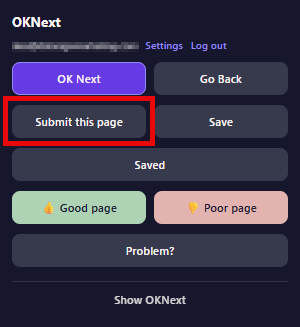
From the pinned extension icon: click Submit this page.
Install the app and log in
Get the OKNext app from the Android page and log in. As with the toolbar, sharing needs a free account.
Option A: share from any other app
In Chrome, or any app that has a page address to share, tap Share and choose OKNext from the list. OKNext opens with the address and asks Submit this page to OKNext? Tap Submit. If you are not logged in yet, it asks you to log in first.
The first time, OKNext may not be in the list yet. In the row of apps that includes Quick Share (the second line of icons), scroll to the right end and tap More, the icon with three dots. OKNext is at the bottom of the list that opens. After you have shared with it once, Android usually shows it in the row. The share menu looks a little different on each phone, but it works the same way.
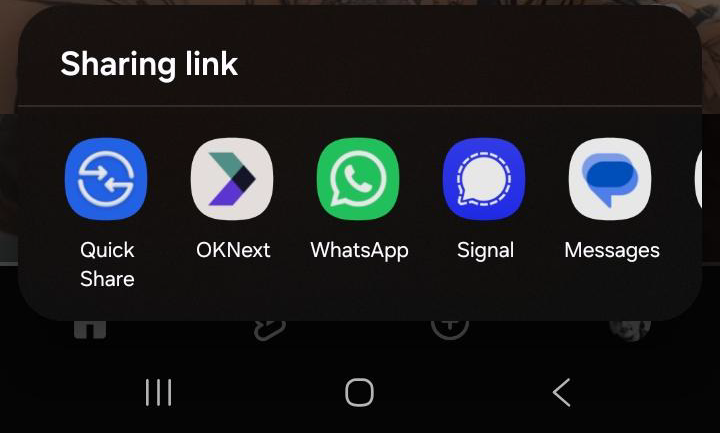
Android's share menu, with OKNext in the row of apps. Option B: submit from inside the app
While you browse in the OKNext app, open the page you want to share (type an address in the address bar, or search from it) and tap Submit in the bottom bar. The app tells you the result, for example Submitted for review!
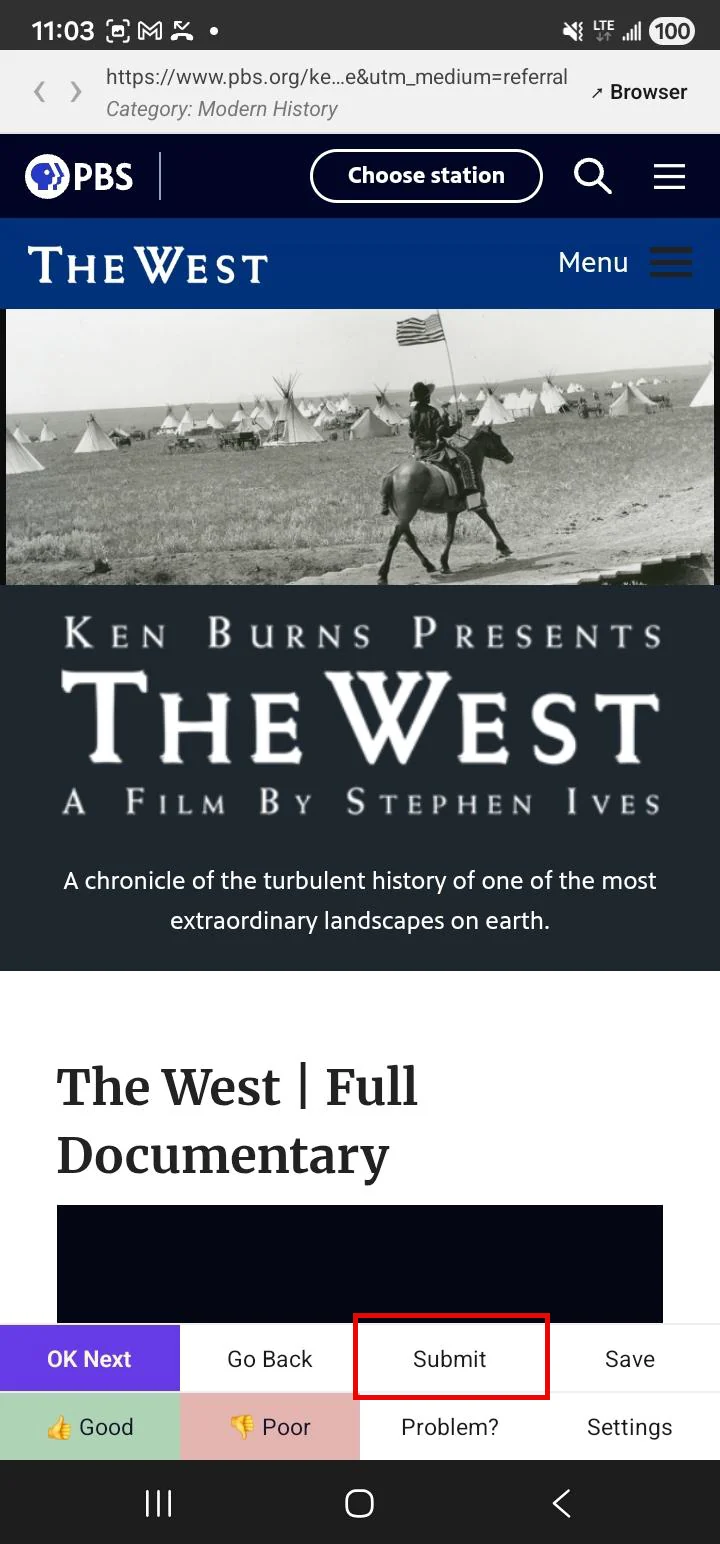
In the OKNext app: tap Submit in the bottom bar. Choose a category if it asks
OKNext picks categories for you. On the rare page where it can't, the app shows a banner reading Tap here to choose one. Tapping it lets you pick a category, and you can skip it: your submission is already in.
Good to know
- What happens after I submit?
- OKNext checks the page and picks its categories. For most people the page then goes into a review queue, where a moderator approves or rejects it. Once approved, it joins the pages shown to everyone who presses Next. Moderators and admins publish immediately.
- What makes a good page to share?
- A page that is worth landing on by surprise: an article, a project, a tool, a collection, a gallery, a personal site, a great explanation.
- What gets turned down?
- Stores, product pages and sales pages (OKNext does not show commercial pages) are turned down straight away, and so are addresses that only work over plain http. Moderators also reject pages that are broken, unsuitable, or not a good place to land by surprise. A page that has already been submitted can't be submitted again, and OKNext tells you when that happens.
- Is there a limit?
- You can submit up to 10 pages a minute. If you hit that, wait a moment and try again.
- Will other people see my name?
- Only on the Top submitters lists, and you choose how: your full name, your first name and last initial (the default, like Alex N.), just your initials, or not at all. Change it under Visibility in Settings > Preferences. Nothing else about you is shown, and your submissions are never tied to your name on the pages themselves.